Hey, I'm back. I'm trying to use the Replace Material With Texture action, and the UVs are all messed up. Can you please make the texture follow the UVs, or am I doing something wrong?
I think it's because, like you know a glb model has individual materials. So you can have 5 for glass, wood. And that action applies it to every material so it looks off. I would recommend using the Replace Material With Texture. That one is more for replacing everything to white, wood, without having to spam 10 actions for every material.
← Return to tool
Comments
Log in with itch.io to leave a comment.
Hey, I'm back. I'm trying to use the Replace Material With Texture action, and the UVs are all messed up. Can you please make the texture follow the UVs, or am I doing something wrong?
I think it's because, like you know a glb model has individual materials. So you can have 5 for glass, wood. And that action applies it to every material so it looks off. I would recommend using the Replace Material With Texture. That one is more for replacing everything to white, wood, without having to spam 10 actions for every material.
that's what ive been using, i put an image to show. ignore the eyes on what its supposed to look like.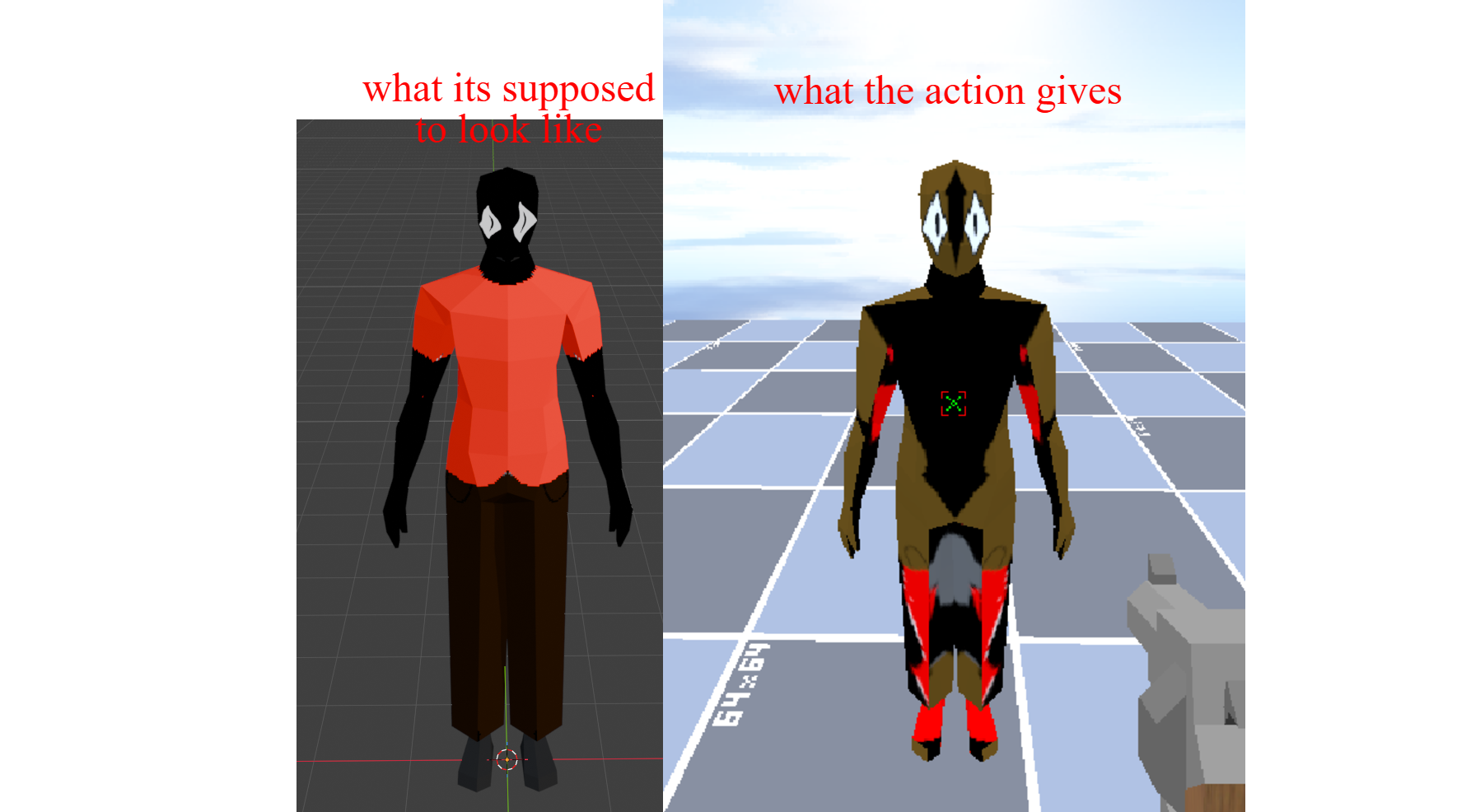
Fixed It! Thanks For The Report, If You Find Something I Would Be Glad To Improve It.
thank you so much!!!
i have been needing a feature to change a texture for so long. tysm!!!